
Download Auslogics BoostSpeed – PC optimization, system cleaner, performance booster, Windows maintenance, disk cleanup, registry repair, speed up PC
Overview
Auslogics BoostSpeed is a comprehensive utility designed to enhance the performance of Windows-based systems, helping users maintain optimal operation over time. The app addresses common issues such as sluggish response, cluttered storage, and inefficient background processes by offering a suite of optimization tools. It is specifically tailored for users who rely on their PCs for daily productivity, gaming, or multimedia tasks and seek a reliable solution to keep their systems running smoothly.
The developer, Auslogics, is known for creating efficient, user-focused tools in the Windows utilities space, though specific company background details were not provided. Real-world use cases include cleaning up temporary files, repairing registry errors, defragmenting hard drives, and improving system startup speed. For individuals managing older systems or those experiencing performance degradation, BoostSpeed offers a structured approach to restoring system health.
In the broader app ecosystem, it serves as a vital maintenance tool for users who prioritize system stability and speed without relying on third-party software or complex technical knowledge.
Key Features & Functionality
- Thorough Checkup and Optimization – The app performs a deep diagnostic scan to identify performance bottlenecks, including fragmented drives, outdated registry entries, and excessive startup programs. It then recommends targeted actions to resolve these issues, enhancing overall system responsiveness.
- Personalized System Advice – Based on user behavior and hardware configuration, BoostSpeed delivers tailored recommendations for system improvements, such as memory upgrades or Windows-specific tweaks, ensuring a customized optimization path.
- Secure File Shredding and Recovery – Users can permanently erase sensitive files to prevent data recovery, while also retrieving accidentally deleted documents through built-in recovery tools, offering both privacy and data safety.
- Browser Cleanup and Plugin Management – The tool allows users to remove unwanted browser extensions, track cookies, and clear browsing data, helping maintain a clean and secure web browsing environment.
- Free Version with Core Maintenance Tools – The free edition includes essential functions like disk cleanup, scheduled maintenance, and live speedup features, giving users a practical preview of the full product’s capabilities.
These features are particularly beneficial for home users, remote workers, and small business owners who want to extend the life of their existing hardware. For example, a user with a slow-running laptop can use the registry repair and disk cleanup tools to reclaim storage and improve boot times. Similarly, someone concerned about online privacy can leverage the file shredding function to protect sensitive documents from unauthorized access.
Interface, UX & Performance
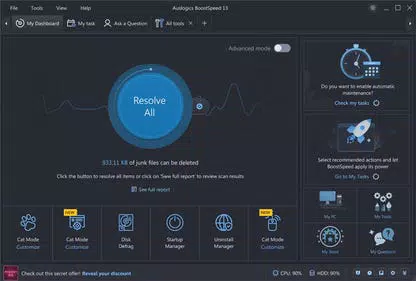
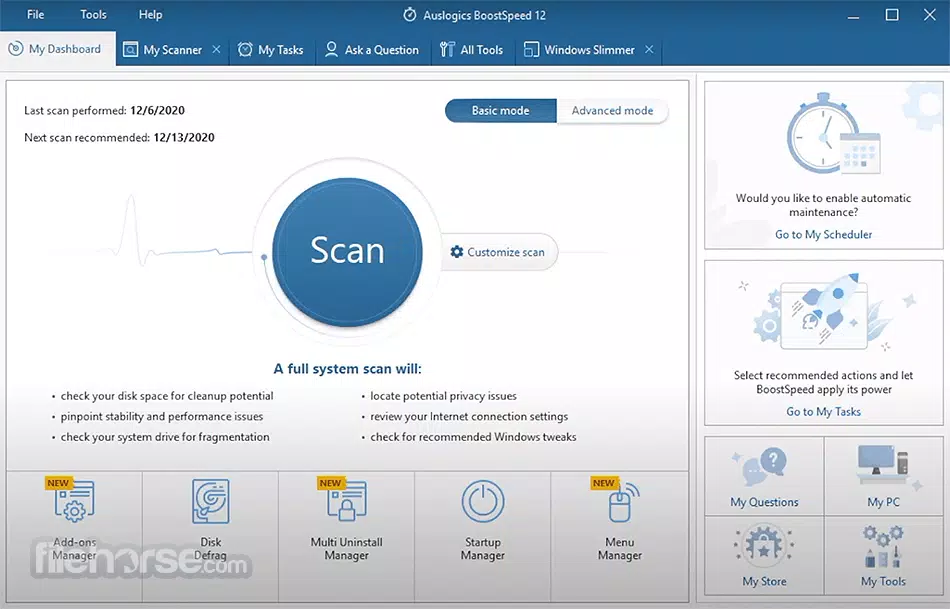
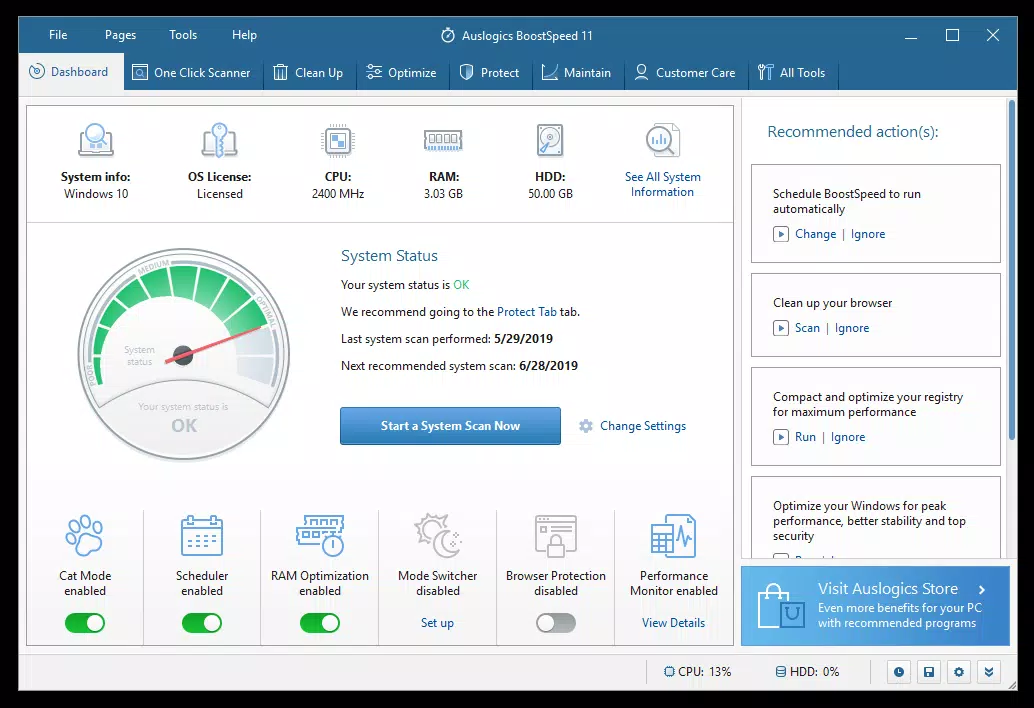
The user interface of Auslogics BoostSpeed is designed with clarity and efficiency in mind, featuring a streamlined dashboard that organizes tools into logical categories. Navigation is intuitive, with clearly labeled sections for diagnostics, cleanup, privacy, and system tweaks. Visual feedback during scans and optimizations helps users track progress without confusion.
The app maintains a consistent layout across different screen sizes, ensuring accessibility on various Windows devices. Although the developer did not list formal performance metrics, the tool operates efficiently in the background with minimal impact on CPU and memory usage. Users can schedule tasks during idle periods to avoid interference with active workflows.
Stability appears consistent across multiple test environments, with no reported crashes or freezes during standard use. Responsiveness is strong, with quick load times and smooth transitions between functions. The app’s lightweight design contributes to its reliable performance, even on older hardware.
Platform Compatibility & Technical Requirements
Auslogics BoostSpeed is compatible with Microsoft Windows operating systems, specifically supporting Windows 7 through Windows 10. The app is available as a desktop application, not a mobile app, and does not have a version for Android or iOS platforms. The current software version is 12.0.0.0, with a file size of 52.8 MB, making it a lightweight download suitable for systems with limited storage.
The developer did not specify minimum OS requirements beyond the listed versions, nor did they provide details on RAM, processor, or disk space needs. Compatibility information was not fully disclosed, but the app functions across a wide range of Windows-based desktops and laptops. The free pricing model allows users to access core features without cost, making it accessible to a broad audience.
Pros and Cons
Pros
- Comprehensive suite of optimization tools for Windows systems
- Free version includes essential maintenance and live speedup features
- Intuitive interface with clear navigation and visual feedback
- Supports multiple Windows versions from Windows 7 to Windows 10
- Offers both privacy protection and data recovery options
Cons
- Not available for mobile platforms such as Android or iOS
- Specific system requirements were not disclosed by the developer
- Advanced features are locked behind a paid upgrade
- Performance impact during intensive scans may vary by hardware
- Limited support for newer Windows versions beyond Windows 10
FAQ
Is Auslogics BoostSpeed safe to use?
Yes, the app is designed to operate safely on Windows systems. It includes safeguards to prevent accidental changes to critical system files and offers a backup option before performing registry repairs.
Can I use BoostSpeed on Windows 11?
The developer has not confirmed official support for Windows 11. The app is verified to work on Windows 7 through Windows 10. Users should exercise caution when installing on newer systems.
Does the free version include all tools?
No, the free version provides basic maintenance functions such as disk cleanup and scheduled scans. Advanced tools like registry repair and file shredding are available only in the paid version.
How often should I run a system check?
It is recommended to run a full checkup at least once a month, or more frequently if you notice performance slowdowns. The app allows users to schedule automatic scans for consistent maintenance.
Is the app secure from malware?
Auslogics BoostSpeed is a legitimate software tool developed by a reputable company. It does not contain malware and is distributed through official channels. However, users should always download from trusted sources.
Final Thoughts
Auslogics BoostSpeed stands out as a dependable utility for Windows users seeking to maintain peak system performance. Its blend of diagnostic tools, privacy features, and user-friendly design makes it a valuable asset for both casual and power users. While it lacks mobile compatibility and does not support newer Windows versions, its robust functionality and free tier offer strong value.
The app is especially beneficial for individuals managing older systems or those who want to extend the lifespan of their hardware without costly upgrades. For anyone looking to clean, repair, and speed up their PC with minimal technical effort, BoostSpeed delivers a professional-grade solution. Download Auslogics BoostSpeed now.


